


I started building with Lovable at the beginning of February this year. By now, it’s one of Europe’s unicorns, currently valued at $4 billion, as it democratises software development. Anyone can chat with it in English to build websites, as it writes code.
I started by building a couple of experimental products, just to try it. After all, building a working web app with just prompting feels magical. I then spent the last three months building Little Parrot, a micro-learning platform for busy product managers. We have one micro-course so far: ‘Write Better with AI: Prompting Foundations for Product Managers’. I believe prompting is one of the most important skills for effectively using AI, and because communicating in writing is a time-consuming activity for a PM, AI can help speed it up.
I joined Lovable Shipped in June, a competition organised by Lovable to build something from idea to a live product in six weeks. Little Parrot ended up ranking number 40 globally, out of 5,800 contestants.
During Lovable Shipped, we supported each other in the community and collaborated on our products. I reviewed and provided feedback on at least ten products a week created by other builders, which exposed me to a wide range of vibe-coded apps.
The Importance of Design When Vibe Coding
Building with AI has an inherent risk of being more generic and less differentiated. Large language models (LLMs) that generate the code when you build by vibe coding are prediction machines, so they predict the most likely output. Many websites I gave feedback on during Lovable Shipped practically looked the same, with identical layouts, colour gradients, and fonts. This isn’t great for building a unique brand.
This is why giving specific instructions on how your product should look and feel is essential. You don’t have to come up with a full design system, though that’s helpful, but specify your brand colours, fonts and give the AI some pointers:
“Smooth hover transitions, fade-in on scroll, soft entrance animations.”
“Soft gradients, muted palette, generous spacing, gentle transitions.”
Lovable has a full guide for inspiration.
How to Prompt Lovable
To be honest, it can be frustrating to build software by prompting. I found it’s easy to get lazy with prompting. I expected Lovable to just figure out the best way to build what I wanted, because figuring out the right user experience is hard. But AI fills in the gaps, and without specific instructions it defaults to the average.
Being specific about what you want to build is the best technique you can do.
Giving long-winded instructions might not help. Instead, structuring your prompt is your best friend when vibe coding. You can use markdown or XML tags to separate parts of your prompt. I wrote more about this in my series on practical prompting techniques. Applying these help the LLM to parse your prompt more effectively, and to “understand” what you want it to do.
Use Technical Language
I’ve found that using technical language with Lovable gets the best results. I tried prompting it in an outcome-oriented way, but at the end of the day, it’s not your developer partner.
While collaboration with a human developer works better if you give them the ‘why’ – the user problem – it’s better to be solution-focused when collaborating with AI. Tell it to build an umbrella in detail, instead of asking it to solve the problem of our user getting wet in the rain.
Giving it implementation details (frameworks, libraries, tools to use) increases the quality of their output.
I found that using Gherkin to explain to Lovable what I wanted works pretty well. Just make sure you think through all the scenarios, otherwise it might not implement all of them. Understandably so, it’s not there to come up with all the corner cases that you missed. Sometimes it follows instructions very literally.
When we were implementing discount codes on Little Parrot, I prompted it:
Scenario: Learner can remove the discount code
Given the learner added a discount code at checkout
When they click the trashcan icon next to the discount code
Then the discount disappears
And the price of the subscription reverts to the original price.
What I failed to do was specify that it should also remove the discount code from the backend and Stripe (which we use as our payment provider).
So when I was testing the flow out, I added one discount code, deleted it, then added another, and encountered an error message. So I asked Lovable:
Why couldn't I apply the "newcode" coupon? I got the "Invalid coupon code or coupon has expired" error. This coupon exists in Stripe.
The cool thing is that Lovable sees all the error logs, so it can detect what the issue is. So, it identified that the previous discount code I added, although was no longer visible on the UI, still existed on the backend:
The issue is that you already have the "testcode" coupon applied to your subscription, and the current implementation of the apply-coupon function has trouble handling multiple discounts on the same subscription.
You can use Lovable without understanding how software works, but some technical knowledge certainly helps to build a more robust product and solve issues quicker. Vibe coding is actually a great way to learn more about coding, because you can ask questions in context from the AI.
Refer to Components
To efficiently build your product, refer to components in your prompts.
By default, Lovable uses Shadcn, a UI component library. You can brows through it for components and refer to them by name: Card, badge, button, modal, input, tooltip, toggle, etc.
Specifying which page, component and UI element you want to change:
On the subscription-checkout, move the “Subscribe now” button to the Order summary component, under the Total and above the "Help us do good things"
Edit Visually
Lovable allows you to select a specific element using the visual edit functionality, so you can also make changes in a targeted way.
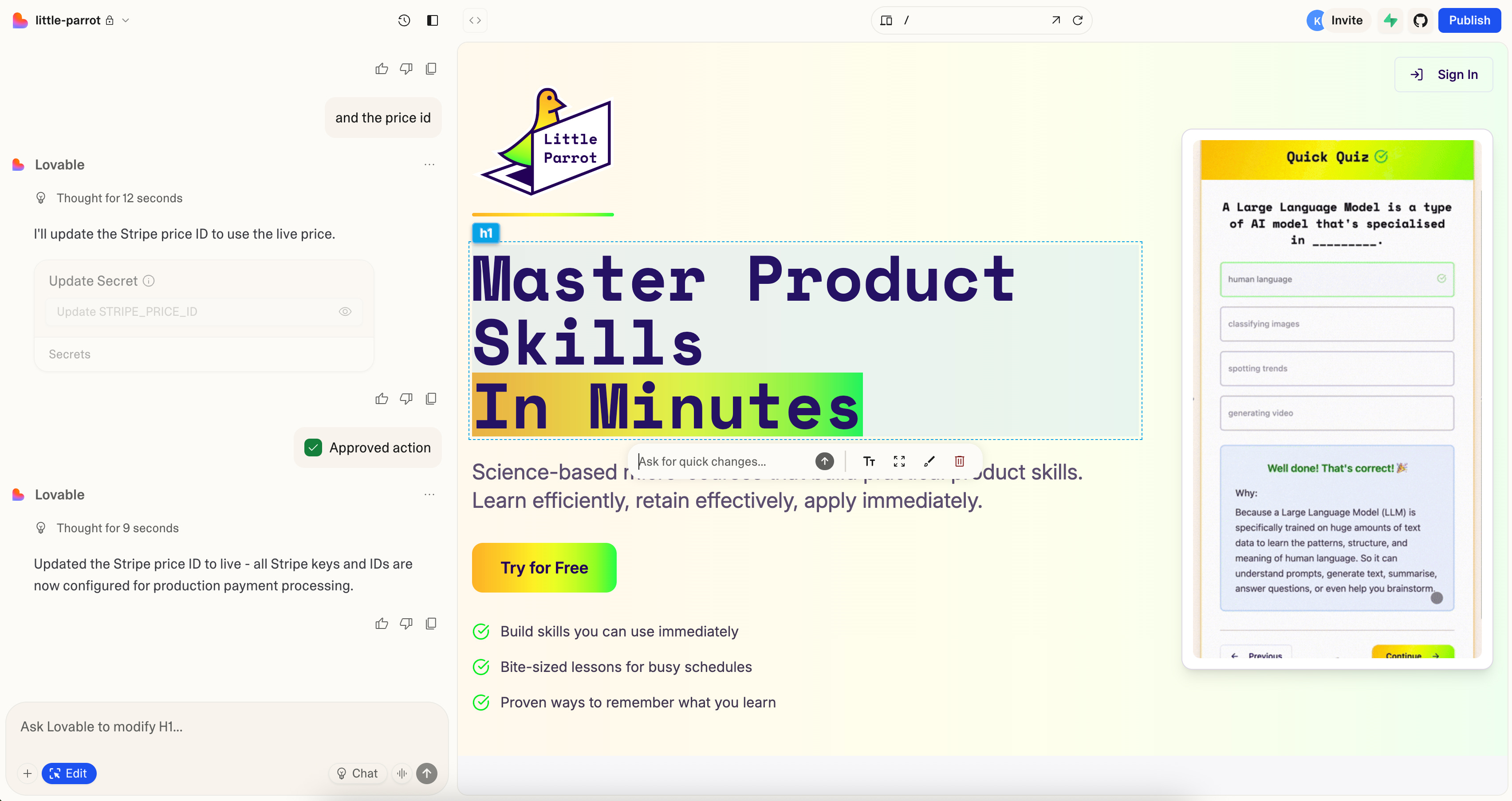
It helps to keep the scope of your change limited, so the AI won’t accidentally overwrite a different part of your app.
How to Fix Bugs
When you build a product, it’s inevitable that bugs happen. When you build a product with Lovable, I suggest using the chat mode to identify the root cause of the issue.
It can happen that Lovable says it fixed something, but the issue still exists. In chat mode, you can ask it to outline a plan before it writes code, then ask questions to clarify. Once you’re satisfied with its answer, you can switch back to building mode and execute the fix.
If it’s a visual issue, taking a screenshot of what’s not working, and then pasting it into Lovable can help it better identify the issue.
If you get into a bug loop and a fix is not happening, you can rollback to the last working version of your product and try to prompt the functionality again. This time you can try a different, more specific prompt with all the learnings from the bug fixing efforts.
Reframe Your Thinking
I repeatedly caught myself expecting the AI to be smarter than me and figure out a better user experience for the app. So I’d lazily give it a half-sentence prompt, expecting it to come up with something superior. Of course, it failed to “think” better than me, which reminded me that I shouldn’t outsource my thinking to AI.
We are bombarded with messages about people building a working product in an hour. These are usually the “build a CRM” or “create an Instagram clone” type of prompts.
I think that only works if you don’t care about how your product ends up working. Without a doubt, you can create something super quickly with vibe coding. But once you build something a bit more complex that needs to work in a specific way, it requires more time than an hour or a day.
And it makes sense. You need to think through how things should work. In my experience, that’s one of the hardest parts of building a product, figuring out what the exact solution should look and work like. Then you have to break it down to small pieces that you can feed to Lovable for the best results.
Even when you are very specific, it’s a good idea to test what you’ve built. With AI, it’s easy to get something that seems correct but doesn’t quite work as you intended. After each change, it’s best to test if what you wanted works as expected, because it’s easier to fix issues right away or revert your change if it went in an unexpected direction.
Go On, Try Vibe Coding
I encourage you to give vibe coding a try. Lovable has a free tier to get you started. Every day your 5 credits get replenished, so you can keep building little by little. It feels very empowering to build a working prototype or app alone. But I still believe that the best products are created by people with different viewpoints.
If you’d like to try Little Parrot to learn practical prompting techniques you can apply to your work, please do give feedback afterwards. We have many hypotheses on what to improve, but we didn’t want to perfect it until we were delighted with the result. That would just be bad product management. Even though, I admit, it’s a very vulnerable feeling to share something you feel is not perfect.